
Validate team access, chat, billing, support, recovery and approved automation with a customer workspace before paid launch.
Ingenious app · In development
Ingenious Control Center
A clearer view of your business. A better way through your day.
Bring priorities, customers, calls, documents and field work into one visual workspace. Personalize your Home screen, prepare callers with shared guides and materials, and explore the details behind your team’s work.
WebCloud Preview
Who it is for
Owners of small service businesses who are running the whole operation out of a calendar, an inbox, and their own memory.
Product terms & updates
Update policy
Introductory price of $49 per user workspace per month, held up to 24 months. Optional modules are billed per user after a 60-day free trial.
From input to outcome
A clearer path through the work.
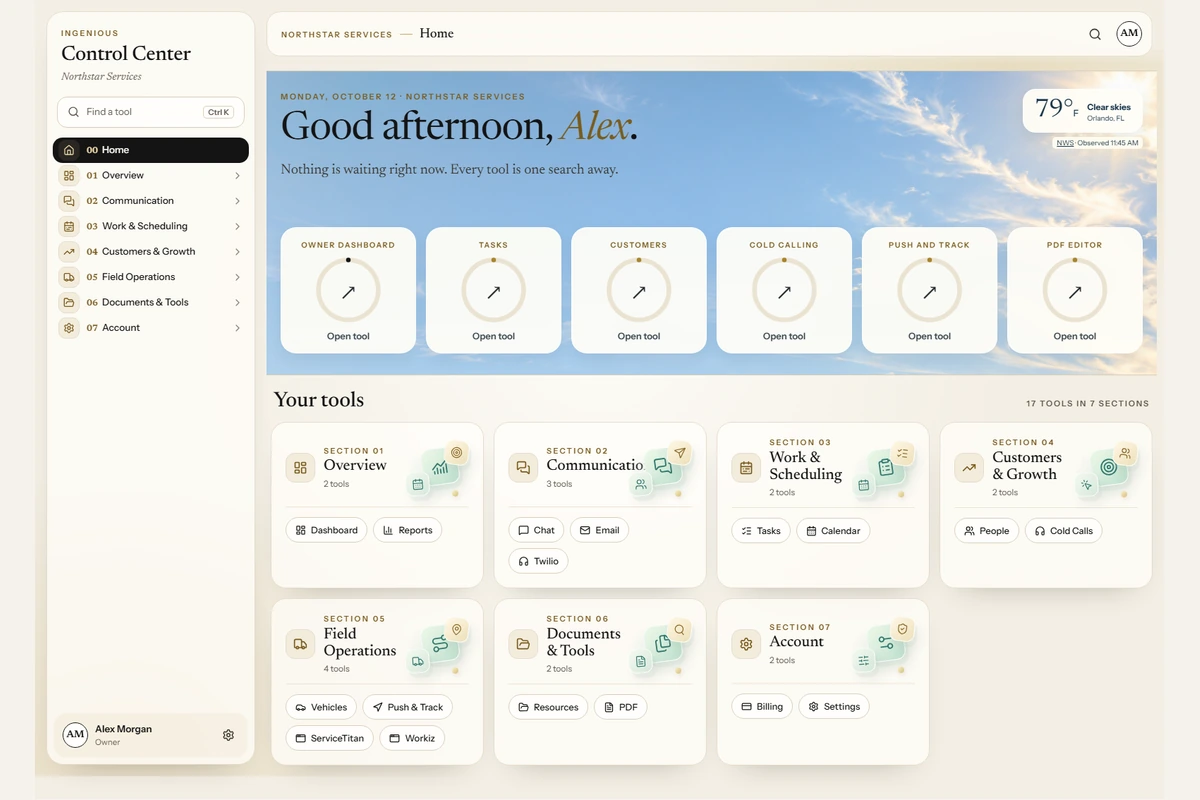
Aurora Atlas interface: choose your six Home boxes, find tools in grouped sections and quick find, and see a personal weather backdrop based on your ZIP code or city. Administrators choose the workspace interface and Home layout.
Interactive Owner Dashboard: switch between Today and This Week, filter priorities and follow-ups, see appointments and employee activity, and open supporting records. Contextual illustrations, clear icons and subtle motion carry through the workspace, with reduced-motion support.
Tasks and AI planning: see completion progress, manage owners, priorities and complete-by dates, and use rolling AutoTasks. Review scheduled AI proposals beside the original task, edit supported details, include or skip changes, and apply your chosen plan.
Customers and Appointments: keep contacts, notes, customer history, next follow-ups and scheduled work together. Authorized CRM connections can add synchronized appointments.
Team Chat and employee photos: team and private conversations, attachments, read receipts and accepted task handoffs. Employees preview and frame their own profile photo; it appears in messages, dashboard activity and calling comparisons.
PDF Editor and Resources: view, mark up, sign, fill and organize PDFs in the browser. Save workspace files and links, or hand a PDF to the separately installed Ingenious Search desktop app and bring the edited copy back.
Push and Track: send a named destination to a paired driver phone, follow driver-confirmed trips on a map, receive arrival alerts and replay recorded journeys. Reuse saved destinations and review trip history.
Caller Start Center: give callers one place for administrator-managed scripts, price sheets, private documents, reference websites and team tips, alongside eight step-by-step guides for setup, calling and conversation techniques.
Business Assistant and Cold Calling: build fresh prospect lists with team-wide duplicate checks, qualify customers for future follow-up, and choose Manual Dial, Dialer or AI Dialer. Keep shared customer history, requested emails and vendor paperwork together.
Calling dashboard: explore outcomes and hourly activity, open the calls behind a metric, and compare permitted caller activity and quality reports. Review ring time, caller-confirmed human conversation time and the reason a call receives full, capped or no pay-per-call credit.
Twilio Control Panel: assign outgoing numbers per caller, route callbacks to the appropriate company, manage forwarding and blocked callers, and sort inbound/outbound reports by day, week or month with counts and average durations.
Email and Vehicle Search: optionally search connected Gmail or Microsoft 365 and review reply drafts, or compare vehicle costs, listing evidence, risks and purchase progress.
ServiceTitan and Workiz: authorized CRM connections support schedule-capacity review and separately scoped Adaptive Lead Control, with connection status and approval information kept visible.
AI assistance: choose included Local AI on a paired Windows worker or optional Ingenious Premium AI. Ask for explanations grounded in the selected workspace records; the dashboard filters and charts work without an AI request.
Reports, Settings and Billing: record financial snapshots with their period and source, configure team roles, menu order and language, and manage your account and support.
Commercial module guide
What belongs in your workspace.
Core features, optional connections and planned work have different availability. Paid launch is pending; optional access depends on your workspace permissions and setup.
Core workspace and account tools
- Owner DashboardCore workspace
- Review today or this week, filter priorities and overdue work, see upcoming appointments, and open supporting records. Employee photos identify dashboard activity; customize cards and ordering for your workday.
- TasksCore workspace
- See completion progress in a visual task overview. Create or import tasks with owners, priorities and complete-by dates; manage rolling AutoTasks and review scheduled AI proposals before applying selected changes.
- AI ServicesLocal AI included; Premium optional
- Included Local AI on a paired Windows worker or optional Ingenious Premium AI for assistance and task planning. Review proposed task changes before applying them; provider and access requirements apply.
- CustomersCore workspace
- Keep customer contacts, history, notes and next follow-ups together. Open Caller Start Center for shared scripts, reference documents, pricing and calling guides; review outcomes from permitted optional AI calls.
- AppointmentsCore workspace
- Create or import appointments and review scheduled work. Connected CRM appointments require an authorized sync.
- File & Link RepositoryCore workspace
- Upload workspace files and save useful links in the included resource library.
- PDF EditorCore workspace
- View, mark up, sign, fill and organize PDFs in the browser. Optionally open a PDF in the separately installed Ingenious Search desktop app and return the edited copy.
- ReportsCore workspace
- Record revenue, receivables, expenses and gross profit with a reporting period and source. These are entered snapshots, not an automatic accounting feed.
- Team ChatCore workspace
- Team and private messages, attachments, read receipts and reviewed task handoffs with recipient acceptance. Employee profile photos identify the people in each conversation.
- Billing & LicenseAccount tools
- View the workspace license and use Ingenious Tools for subscription, invoice and support requests.
- Settings & SupportAccount tools
- Configure company details, roles, module access, menu order, integrations and language. Choose Classic or Graphical navigation, customize Home boxes, and let employees preview, frame and save their own workspace photo.
Calling and field operations
- Twilio Control PanelBusiness tools; setup required
- Manage connected numbers, per-number forwarding and blocked callers. Assign outgoing numbers per caller, route callbacks to the right company, and sort inbound/outbound reports by day, week or month with counts and average durations.
- Push and TrackBusiness tools; setup required
- Send destinations to paired driver phones, follow confirmed trips on a map, reuse saved places, receive arrival alerts and replay recorded journeys. Requires a supported paired phone and driver confirmation.
Optional modules and connections
- Email Search & ReplyOptional module
- Search connected Gmail or Microsoft 365, read messages and prepare reply or forward drafts for review. Messages are not sent automatically.
- Vehicle SearchOptional paid module
- Import or discover supported vehicle listings, compare acquisition costs and evidence, review risks, and track seller contact, inspections and offers.
- Business Assistant & Cold CallingOptional module
- Prepare with Caller Start Center, shared company materials and eight calling guides. Build fresh prospect lists with team-wide duplicate checks, use Manual Dial, Dialer or AI Dialer, and track follow-ups and paperwork. Explore caller comparisons, call quality, ring and conversation time, and explained pay-per-call credit.
- ServiceTitan ConnectionOptional connection
- Configure authorized ServiceTitan access and schedule-capacity policies. Adaptive Lead Control requires its own capabilities, worker, approved providers and shadow-mode review.
- Workiz ConnectionOptional connection
- Configure authorized Workiz access for schedule-capacity review and scoped Adaptive Lead Control. Connection and provider approval are required.
Planned and custom commercial work
- Hiring ManagementCustom work; not available
- Candidate scoring, interviews and hiring follow-up are planned commercial workflows. Scope and availability must be confirmed before purchase.
- PayrollCustom work; not available
- Payroll review, adjustments and exports are planned commercial workflows. Scope and availability must be confirmed before purchase.
- National Account ManagerCustom work; not available
- Account onboarding, required paperwork and submission tracking are planned commercial workflows.
- SMS & Call TasksPlanned; not available
- Phone-event task capture is planned. Automatic SMS, call and voicemail ingestion is not currently available in the commercial edition.
- Estimate Follow-UpCustom work; not available
- An estimate pipeline with assignments and conversion reporting is planned. Core customer follow-up dates are available separately.
Record Transfer Bridge and Instant Estimate Creator remain future concepts. The personal edition has additional tools that are outside this commercial offer.
Trust and control
Designed around practical results.
- Commercial build 1.55.1, verified October 12, 2026. Screens show the current interface with fictional demonstration data. Public paid launch remains pending.
- The latest visual treatment works with Classic and Graphical navigation. Optional modules follow workspace permissions, setup and eligibility; employee photos and caller documents stay within the authorized workspace.
- Hiring, Payroll, National Accounts, SMS & Call Tasks and Estimate Follow-Up still require commercial implementation or acceptance before they can be offered.
- Record Transfer Bridge and Instant Estimate Creator are future modules; neither is a current commercial workflow.
- The core workspace runs on the web. Approved local automation may require a Windows agent and supervised provider setup.
See it in action
Current interface captured October 12, 2026 with fictional demo data. Select a screenshot to explore the details. Modules shown depend on workspace access and setup.
Product updates
Version history
Updates are being prepared.
Published release notes will appear here newest-first.
Product work
Features and bugs getting attention
Implement consented phone-event capture and reviewed task creation before enabling this module or its trial.
Replace the custom-build placeholders with scoped, tested workflows and confirm each module separately before offering access.
Define and implement these future modules, including supported records, review steps and delivery terms.
What you need to run it
- A desktop or tablet with web access and an internet connection
- An authorized commercial workspace and active entitlement when paid access opens
- Customer-owned provider accounts and granted capabilities for optional connections
- A supported Windows setup for workflows that require the automation agent
Questions, answered
What is included in the core workspace?
Owner Dashboard, Tasks, Customers, Appointments, Team Chat, File & Link Repository, PDF Editor, Reports, Push and Track, Twilio Control Panel and Local AI, plus Settings and Billing. Connected phone services, paired devices and optional modules require their own setup and permissions.
Can I change the interface?
Yes. An administrator selects Classic or the Aurora Atlas Graphical interface in Settings → Interface and can allow individual choices. Administrators can customize all six Home boxes and restore the defaults. Each user can set a ZIP code or city for a weather and daylight backdrop. Both navigation styles use the refreshed tool visuals.
What is new in the refreshed dashboards?
The latest update adds contextual artwork, clearer icons and lightweight motion across tools, customizable Home boxes, local weather and employee profile photos. Tasks has a visual completion overview. Caller Start Center brings shared resources and eight guides into the calling workflow; calling reports add clearer timing, credit and callback details. Owner, calling, AI review and trip dashboards retain their interactive filters and drill-downs.
What does Push and Track require?
An authorized workspace and a paired, supported Ingenious Notifications Android phone with location permission. A driver goes On duty and confirms the destination before navigation and trip tracking begin. Positions are shared while the confirmed trip is en route; arrival, cancellation or ending the trip stops that tracking. Phone connectivity and location availability affect updates.
Does headset calling require AI or recording?
No. Plain PC headset calling uses a configured Twilio connection and your selected microphone and speaker. Optional AI calling and recording are separate choices with their own consent, notification and access requirements. AI-generated contact details and follow-ups require employee review.
Can I edit PDFs without leaving Control Center?
Yes. The browser PDF Editor supports text and markup tools, signatures, forms and page organization. An optional handoff opens the document in the separately installed Ingenious Search desktop app; this is a connected workflow, not an embedded desktop application.
What is the introductory offer?
The planned introductory offer is $49 per month with no setup fee, held for up to 24 months from subscription start. It includes two users and up to three hours of training and customization. Paid launch remains pending; no annual introductory plan is specified.
How do optional-module trials and prices work?
Eligible optional modules have a 60-day trial starting when that module is added, after price and renewal consent. Current configured monthly rates per user are $9 for Email, Vehicle Search or Cold Calling, $19 for a ServiceTitan or Workiz connection. Paid continuation requires the displayed price and terms to be accepted. Third-party usage, managed hosting and extra consulting are separate.
Which modules are still planned or custom work?
Hiring, Payroll, National Accounts, SMS & Call Tasks and Estimate Follow-Up remain planned commercial workflows. Record Transfer Bridge and Instant Estimate Creator are future concepts. A listed version or a feature in the personal edition does not make these available to commercial customers.
Does it automatically capture every call, text or email as a task?
No. Core tasks can be created or imported, and Team Chat supports reviewed task handoffs when activated. Email provides connected search and reviewed drafts. The commercial SMS & Call Tasks module is not yet shipped, so automatic phone-event ingestion is not promised.
Are revenue and gross profit synchronized automatically?
Core Reports uses financial snapshots entered with their period and source. Any accounting or CRM synchronization must be separately configured, authorized and verified for your workspace.
Do I need to install anything?
Use the core web workspace on a desktop or tablet with internet access. Some approved provider automations require the Windows agent, customer-owned accounts and supervised setup. Public agent distribution still requires release acceptance.
Are other Ingenious apps included?
Ingenious Search, Ingenious Notifications and the Buddy applications have separate products, release status and access requirements. A Control Center module or Android route connection does not automatically include those purchases.
What does Ingenious Premium AI cost?
Premium AI is an optional add-on to a valid Control Center license: $9/month includes 200 actions. Companies can explicitly create a shared pool of 200-action blocks at $9/month each. A $4.50 action pack adds 50 non-expiring actions, usable without an AI subscription. Premium purchases open only after payment and provider verification.
How are AI actions counted?
One successful assistance answer or valid planning result costs one action, including a valid no-changes-needed result. Applying an existing plan is free. Failed or invalid results restore the reserved action; retries cannot charge twice. Monthly actions are used first and expire at the billing-period boundary. A successful paid renewal grants a new allowance. Purchased actions do not expire. Control Center and Ingenious Search balances remain separate.
How do company pools and limits work?
The company owner creates the pool, chooses its monthly blocks, enables each member and optionally sets monthly member caps across all actions. New members have no pool access automatically and use their own login. Limits reset with the subscription period, or at the start of each UTC month for purchased-only pools. Block changes and cancellation take effect at renewal. There are no automatic top-ups or silent changes of funding source.
What does Local AI require?
Local AI inference is included and unmetered. Pair your own Windows worker to your commercial workspace, install the Ingenious Gemma 4 E4B model package and local runtime, and keep the computer awake for scheduled work. Workspace access, module permissions and a valid Control Center license are required. If Premium is unavailable or exhausted, explicitly choose Local AI.
How do I get help with AI?
Use Help & feedback beside the AI choice for setup, billing/balance or answer-quality help. Review any answer excerpt before sharing it. Your request reference and delivery status remain visible, and retrying delivery keeps the same ticket.
What is in Caller Start Center?
Eight built-in guides cover shift preparation, headset setup, lists, Manual Dial and Dialer, AI Dialer, the call form, hourly/PPC verification and conversation techniques. Administrators add approved scripts, price sheets, links, tips and private documents. The guide-review checklist is saved in the current browser; company prices and approved scripts come from your team.
How do employee photos work?
Employees upload a JPG, PNG or WebP, preview the square framing and save their own photo. Photos identify people in dashboard activity, calling comparisons and team/private chat. Access is limited to signed-in workspace members; initials appear when a photo is unavailable.
Follow the launch
Get an update when Ingenious Control Center reaches its next milestone.
Occasional product updates and launch news. No purchase is being offered yet.